

A website can look beautiful and still struggle badly in search results. That happens when design focuses only on appearance while ignoring the structural, technical, and content elements that help search engines understand and trust a site. Businesses often think SEO starts after the website is finished, but the truth is much simpler and much more important: SEO-friendly web design should be part of the website from the beginning.
Google does not rank websites based only on style. It looks at how pages are structured, how quickly they load, how well they work on mobile devices, how clearly they answer user intent, and how easy they are to crawl and navigate. In other words, Google tends to favor websites that create a strong overall experience.
If you want to build a website Google loves, you need more than a clean homepage and attractive branding. You need a site that is useful, organized, fast, relevant, and easy for both users and search engines to understand. When those pieces come together, your website becomes stronger not only for rankings, but also for conversions, trust, and long-term business growth.
What SEO-Friendly Web Design Really Means
SEO-friendly web design is the practice of building a website so search visibility and user experience support each other. Instead of treating SEO like a separate layer added later, the site is designed with ranking factors, search intent, and usability in mind from day one.
That means the design is not just about colors, fonts, and layout. It also includes:
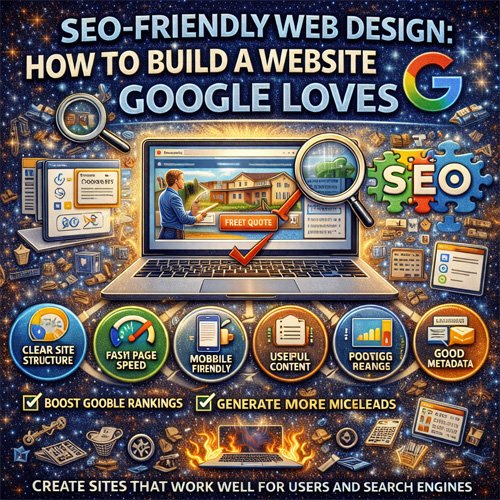
- Clear site structure
- Fast page speed
- Mobile responsiveness
- Strong heading hierarchy
- Useful page content
- Logical navigation
- Optimized images and media
- Internal linking that supports page relationships
When these elements are built together, the result is a website that feels better to use and gives Google stronger signals about quality and relevance.
Start With Clear Site Structure
One of the most important parts of an SEO-friendly website is structure. Search engines need to understand how your pages connect, which pages matter most, and what topics each section of the site is meant to cover. Visitors need that same clarity.
A strong structure helps users move naturally from one page to another and helps Google crawl the site more effectively. Important pages should not be buried behind confusing menus or disconnected from the rest of the content.
A well-structured website often includes:
- A clear homepage
- Dedicated service or product pages
- Logical categories or content groupings
- Simple navigation menus
- Internal links that connect related pages
If the site structure is messy, even strong content can struggle to perform.
Design for Fast Page Speed
Page speed plays a major role in both user experience and SEO. Visitors expect websites to load quickly, and Google wants to send users to pages that perform well. A slow website creates frustration, increases abandonment, and weakens the overall experience.
Many speed problems come from design choices such as oversized images, excessive animation, too many scripts, or bloated page builders. A website can still look polished and modern without being heavy and slow.
Faster websites tend to:
- Keep visitors engaged longer
- Reduce bounce rates
- Support better mobile experience
- Create stronger conversion opportunities
- Perform better in search visibility over time
Good design is not just about what users see. It is also about how efficiently the page works behind the scenes.
Make Mobile Experience a Priority
A website that looks great on desktop but fails on mobile is no longer good enough. Many users search, browse, compare, and contact businesses from their phones. Google also pays close attention to mobile usability when evaluating websites.
An SEO-friendly website should be designed for smaller screens with the same level of care as desktop. Text should be readable, buttons should be easy to tap, menus should be simple, and forms should not feel frustrating. The site should not force users to zoom, squint, or fight through awkward layouts.
A strong mobile experience supports both rankings and results because it helps users stay on the site long enough to act.
Use Clear Heading Structure
Headings are important for both readability and SEO. They help organize page content so users can scan it more easily, and they help search engines understand the main topics and subtopics on the page.
A strong page usually includes one clear main heading and supporting subheadings that guide the reader through the content. This structure makes information easier to digest and creates better topical clarity.
A page with poor heading structure often feels disorganized, even if the content itself is useful. Clean structure helps Google understand relevance and helps visitors stay engaged longer.
Create Content Around Real Search Intent
Google wants to rank pages that match what users are actually searching for. That means website content should not be vague or generic. Each important page should exist for a reason and align with a clear need or question.
For example, a service business should not rely on one broad page to explain everything. Instead, it may need focused pages for individual services, common customer needs, or location-specific offerings. This makes the site more useful and increases the chance that each page will align with a real search.
When content is built around user intent, the website becomes more relevant to both Google and the people visiting it.
Keep Navigation Simple and Logical
Navigation is one of the most overlooked parts of SEO-friendly design. If users cannot find what they need quickly, they may leave. If search engines have trouble understanding your navigation paths, important pages may become harder to crawl and support.
Good navigation is simple, clean, and intuitive. It should help users understand where they are, where they can go next, and how the site is organized. Overcomplicated menus often create friction instead of helping.
In most cases, simpler navigation supports better usability, stronger page discovery, and a healthier overall site structure.
Optimize Images Without Losing Quality
Images are important for design, branding, and engagement, but they can also become a major SEO problem if handled poorly. Large, uncompressed images often slow pages down and create unnecessary performance issues.
SEO-friendly image use means:
- Choosing the right dimensions
- Compressing files for faster loading
- Using descriptive file names where appropriate
- Making sure images support the page rather than clutter it
Visual quality still matters, but the goal is to balance appearance with performance. A page full of heavy media may look impressive at first, yet perform poorly where it matters most.
Build Internal Links That Support the Whole Site
Internal linking helps Google understand how your pages relate to one another. It also helps users discover more content naturally. A strong internal linking strategy turns your website into a connected system instead of a collection of isolated pages.
Service pages can link to related blog posts. Blog posts can link back to services. Important pages can be supported through homepage links, footer navigation, or contextual links within content. These pathways help distribute value and reinforce topical relevance.
Internal links should feel useful and natural. When done well, they make the website easier to explore and easier for Google to interpret.
Use Metadata That Matches the Page Purpose
Title tags and meta descriptions are small elements with big importance. They help search engines understand page relevance and influence how your pages appear in search results.
A strong title tag should reflect the main subject of the page clearly. A good meta description should support that subject and encourage the right kind of click. These elements should not be duplicated across pages or treated as an afterthought.
Well-written metadata makes your website more understandable, more relevant, and more appealing in search listings.
Support Local SEO When It Matters
If your business serves a specific area, your website should reflect that. Google wants to connect local users with local solutions, so your pages should make it clear where you work and who you help.
This often means including:
- Service area references
- Location-based service pages
- Clear contact details
- Locally relevant content
- Consistent business information across the site
A strong local design and SEO strategy helps your business appear more relevant to the people who are most likely to become customers.
Design for Trust, Not Just Rankings
Google cares about user satisfaction, and users care about trust. That means an SEO-friendly website should also look professional, feel credible, and make the business seem worth contacting or buying from.
Trust-building design often includes:
- Clear branding
- Readable layouts
- Testimonials or reviews
- Visible contact information
- Strong calls to action
- Professional images and visual consistency
Rankings matter, but once visitors arrive, trust is what helps turn them into leads or customers.
What a Website Google Loves Usually Has
A website that performs well in search often shares a few important strengths:
- Fast, clean performance
- Mobile-friendly design
- Clear navigation and structure
- Useful, relevant page content
- Strong heading hierarchy
- Logical internal linking
- Good metadata and page targeting
- Trust signals and clear calls to action
None of these pieces works best alone. Google tends to favor websites where the full experience feels useful, relevant, and well built.
Final Thoughts
SEO-friendly web design is not about forcing search tactics into a website after it is already finished. It is about building the website correctly from the start. When design, speed, structure, content, mobile usability, and SEO strategy all work together, the result is a site that performs better in search and creates a better experience for visitors.
At WebDesignerProSEOExpert.com, the websites Google loves are usually the same websites people love using. They are fast, clear, relevant, trustworthy, and built with intention. When your site reflects those qualities, it becomes more than a digital presence. It becomes a stronger engine for traffic, leads, and long-term growth.